
Featured image for how to Hulu streaming TV shows
Image source: b2c-contenthub.com
Finding fresh series can feel overwhelming when a streaming library grows every week. In this guide, you will learn practical ways to surface new TV shows on Hulu without endless scrolling. We cover search tricks, recommendation tools, watchlist habits, and simple alerts so you can spend less time browsing and more time watching.
📑 Table of Contents
Start With the Homepage
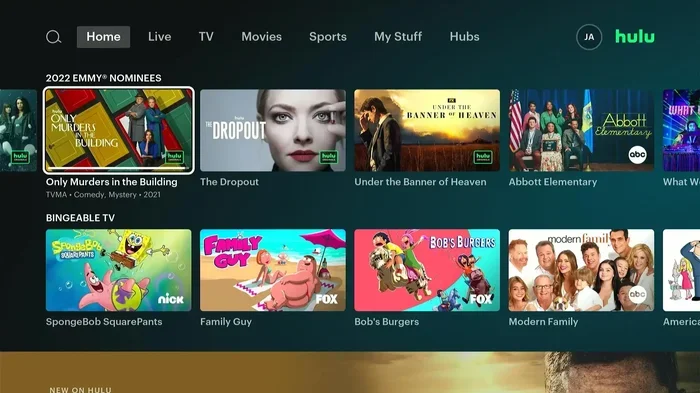
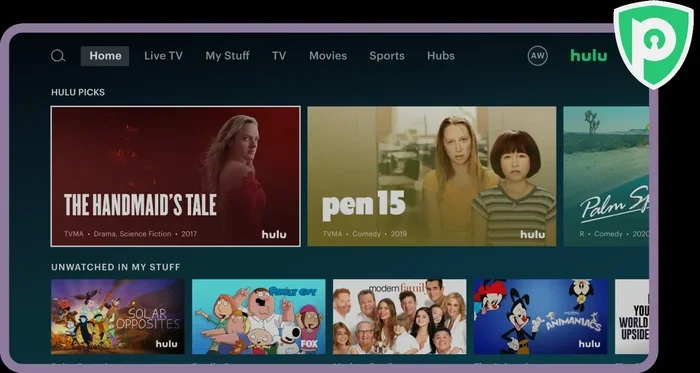
When you open Hulu, the homepage is the fastest place to spot new TV shows. The platform usually reserves the top rows for fresh arrivals, popular picks, and personalized suggestions. If you want a quick win, begin here before you dive into search.
The homepage can feel busy at first, especially if you share an account with other viewers. Different profiles may see different rows, so make sure you are in the profile you want. If you often watch comedies, you may see more comedy rows. If you lean toward dramas, the homepage may shift toward those titles. That personalization can help, but it can also hide newer shows that do not match your recent habits.
A good habit is to scan the top three or four rows each time you log in. Look for labels that suggest recent additions or trending picks. If you see a show that sounds interesting, pause and read the description before you commit. A quick scan saves time later because you can rule out titles that do not match your mood.
Look for fresh and trending rows
Many viewers miss the small labels under each row. Those labels often hint at what the platform is trying to highlight. Some rows focus on newly added series. Others emphasize what is popular right now. Either one can be useful when you want fresh TV shows.
If you are hunting for something new, prioritize rows that mention recent additions or trending content. Those sections are often updated more frequently than evergreen rows. They are not guaranteed to show every new series, but they are a strong starting point.
Check the right profile
If your account has multiple profiles, each one may show a different mix of recommendations. That matters when you are trying to find new shows because one profile may be buried under old preferences. Switch to the profile that best matches the viewer you are helping.
You may also want to create a profile dedicated to exploring new series. A clean profile can reduce noise from older watch history. It can also make recommendations feel fresher because the system has fewer past choices to lean on.
Use Search Like a Pro
Search is the most direct way to find new TV shows on Hulu, but it works best when you use it intentionally. Typing a broad term and hoping for the best can waste time. A few small adjustments can make search much more useful.
Visual guide about how to Hulu streaming TV shows
Image source: purevpn.com
Start with a simple keyword related to the kind of show you want. You might search by genre, mood, character type, or even a setting. If you want something light, try a term that reflects that tone. If you want a mystery, use a word that points toward suspense. The more specific your starting point, the easier it is to narrow the results.
After you search, do not just grab the first title you see. Take a moment to scan the results and look for patterns. You may notice a cluster of similar shows, which can help you decide what style you are in the mood for. That approach is especially helpful when you are exploring new series because you may not know the titles yet.
Filter by genre and mood
Genre filters can save a lot of scrolling. If you know you want comedy, drama, sci-fi, or reality-based series, use those filters to cut down the list. Mood matters too. Sometimes you want something short and breezy. Other times you want a deeper story you can sink into for several episodes.
A practical tip is to combine genre with a simple description in your mind. For example, you might want a workplace comedy or a crime series with a small cast. When you keep that image in mind, it becomes easier to judge whether a show matches your interest.
Sort and compare results
After you search, compare a few titles side by side. Read the short descriptions and look at the episode count if it is visible. A new series with only a few episodes may be a low-commitment experiment. A longer series may be a better fit if you want a story that unfolds over time.
If you are comparing several options, ask yourself three quick questions. Do I like the premise? Does the tone seem right? Am I willing to try the first episode today? Those questions help you avoid getting stuck in endless browsing.
Let Recommendations Work for You
Hulu’s recommendation system can be a powerful tool when you want new TV shows, but it works best when you give it useful signals. The more consistently you interact with the platform, the more tailored the suggestions can become. That does not mean you need to overthink it. Small habits are enough.
One of the easiest signals is simply continuing a show you enjoy. If you start a series and keep watching, the platform may notice that pattern. Likewise, if you stop watching something quickly, that may also shape future suggestions. You do not need to force anything. Just use the service in a way that reflects your real preferences.
Another helpful habit is to pay attention to similar-title suggestions. When you open a show you already like, you may see related series nearby. That can be a shortcut to new TV shows that share the same tone, pacing, or subject matter.
Use your watch history wisely
Your watch history is not just a record of what you have seen. It also influences what the platform highlights next. If you want better recommendations, keep your viewing honest. Watch what you actually enjoy, and do not click around just to confuse the system.
If you are helping a family member find new shows, remember that their recommendations may differ from yours. A teen, a parent, or a friend may need a separate profile so their suggestions stay relevant. That keeps the recommendations focused instead of mixed together.
Rate, save, and revisit
Saving a show to your watchlist is one of the simplest ways to keep track of new titles. When you see a series that looks promising, add it instead of trying to remember it later. A watchlist gives you a shortlist to return to when you have time to watch.
If the platform offers ways to interact with titles, use them when they feel natural. For example, if you can mark a show as something you want to watch, that can help you stay organized. The goal is not to perfect the algorithm. The goal is to make your own browsing easier.
Build a Better Watchlist
A watchlist is more than a list of titles. It is a planning tool. When you are trying to find new TV shows, a good watchlist helps you separate “maybe later” from “I really want to try this.” That distinction matters because streaming libraries can become overwhelming fast.
Start by adding titles that genuinely sound interesting. Do not fill the list with everything you see. Be selective. A focused watchlist is easier to review than a giant pile of possibilities. You can always add more later once you have a sense of what you enjoy.
It also helps to organize your watchlist mentally by commitment level. Some shows are short. Others are long-running. Some are episodic and easy to jump into. Others need more attention from the first episode. Grouping titles by how much time they may take can help you choose based on your schedule.
Group titles by mood or commitment
When you are deciding what to watch, mood often matters more than anything else. You might want a light show after a long day. Or you might want something intense only on the weekend. If you sort your watchlist by mood, you can pick faster.
Commitment is just as important. If you only have an hour, a series with short episodes or a limited run may be a better choice. If you are ready for a longer arc, a multi-season show may be more satisfying. Thinking in those terms keeps you from starting something you cannot finish.
Keep the list fresh
A watchlist works best when you revisit it. If you keep adding titles without ever choosing one, the list can become another source of overwhelm. Instead, review it once in a while and remove anything that no longer sounds appealing.
You may also notice that some titles lose their appeal after a few days. That is normal. Streaming discovery is a process, not a one-time event. The point is to keep a manageable set of options so you can act when the right moment arrives.
Check New and Popular Sections
Beyond the homepage and search, Hulu often includes sections that highlight recent additions or widely watched series. These areas can be useful when you want new TV shows because they gather attention in one place. They are not the only way to discover content, but they are worth checking.
New sections can change as titles are added and rotated. Popular sections may reflect what many viewers are currently watching. Both can give you a quick sense of what is happening on the platform. If you are short on time, these sections can help you narrow your options without digging through everything.
One caution is to remember that popularity does not always equal personal fit. A show may be widely watched and still not match your taste. Use these sections as a discovery tool, not a final answer. If something catches your eye, read the description and sample the first episode before you commit.
Compare trending shows with your taste
When you see a trending title, ask whether it fits your preferences. A series might be popular because it has a strong premise, a well-known cast, or a memorable style. Those are useful clues, but they do not guarantee you will enjoy it.
A quick comparison can help. Think about shows you have liked before. Then ask whether the new title feels similar in tone, pacing, or subject. If the answer is yes, it may be worth a try. If the answer is no, you can skip it without guilt.
Watch the first episode before committing
The first episode is often the best test. It gives you a sense of the characters, the style, and the pace. If the opening feels engaging, you have a reason to continue. If it does not, you have not spent much time on it.
This is especially useful when you are exploring new TV shows because you may not know what to expect. A short trial episode can save you from committing to a series that is not a good match. It is a simple habit, but it works.
Use External Clues Wisely
Sometimes the best hint about a new show comes from outside the platform. A trailer, a review, or a conversation can tell you whether a series is worth exploring. External clues are helpful because they give you context before you start watching.
Trailers can show tone, pacing, and visual style. Reviews can explain the premise and point out strengths or weaknesses. Social discussion can tell you whether people are excited about a show. None of those sources is perfect, but together they can help you decide what to check first.
The key is to use outside information as a filter, not a verdict. If a show sounds interesting, verify it on Hulu before you get too attached. Titles can be described in many ways, and marketing language can be optimistic. A balanced approach keeps you from chasing every buzzy recommendation.
Read descriptions and watch trailers
Before you press play, read the show description carefully. Look for the central idea, the setting, and the kind of conflict driving the story. Those details often tell you more than a catchy title alone.
Trailers can add another layer. They may reveal how a show looks and feels, which matters if style is important to you. A trailer can also help you decide whether the pacing seems too fast, too slow, or just right.
Ask friends or check discussion spaces
If you have friends with similar tastes, ask them what they are watching. Personal recommendations can be surprisingly useful because they come with context. A friend may know that you like character-driven stories or quick episodes, and they can factor that into their suggestion.
Discussion spaces can also help, especially when people explain why they liked a show. Look for reasons that matter to you. If several people mention the same strength, that may be a useful signal. If opinions are mixed, that may simply mean the show is not for everyone.
Troubleshoot When a Show Is Missing
Sometimes you expect a show to be on Hulu, but you cannot find it. That can be frustrating, especially when you are trying to find new TV shows quickly. In many cases, the issue is not a glitch. It is a matter of availability, profile settings, or how the title is listed.
One common reason is that the library changes over time. Titles can be added, removed, or moved to a different placement. Another possibility is that the show is available only in certain regions or under a different name. If you are using a shared account, the profile you are in may also affect what you see.
Before you assume the title is gone, try a few simple checks. Search by a variation of the name. Confirm you are in the right profile. Look for the show under a related genre or collection. These small steps often solve the problem faster than assuming the platform is being difficult.
Confirm availability and profile settings
If a title seems missing, start with the basics. Make sure you are signed into the correct account and profile. If the profile has strong old preferences, it may be hiding some newer results. Switching profiles can make a difference.
You can also try a broader search. Sometimes a show appears under a full title, a shortened version, or a seasonal label. A small change in the search term can reveal what you are looking for.
Try different search terms or profiles
If one search term does not work, try another. You might use the name of a main character, the setting, or a related genre. That can help when the exact title is not returning results.
If the account has several profiles, test another one. A different profile may surface the show more clearly. This is especially useful in households where viewers have very different tastes.
Make Discovery a Habit
Finding new TV shows on Hulu gets easier when you treat it like a routine instead of a random hunt. A few small habits can make browsing feel lighter and more productive. The goal is not to watch everything. The goal is to find the right things faster.
You might set aside a few minutes once a week to check the homepage, search for a genre you enjoy, and update your watchlist. That simple rhythm can keep your options fresh without turning discovery into a chore. Over time, you will learn which sections, filters, and search styles work best for you.
The best approach is the one that matches your time and taste. If you like quick decisions, rely on search filters and short trial episodes. If you enjoy exploring, spend more time comparing recommendations and reading descriptions. Either way, the process becomes smoother when you use the same habits repeatedly.
Set a weekly browse routine
A weekly routine helps because it keeps discovery manageable. Instead of opening Hulu with no plan, you can spend a short, focused session looking for new shows. That reduces the chance of getting lost in endless rows.
During that session, you can do three simple things. Check the homepage for fresh rows. Search for a favorite genre. Update your watchlist with one or two promising titles. That is enough to keep momentum without taking up too much time.
Keep a shortlist of favorites
A shortlist is different from a giant watchlist. It is the small set of shows you truly want to start soon. Keeping that list short makes it easier to choose when you have time to watch.
When you add a new title, ask whether it deserves a spot on the shortlist. If it does, keep it there until you watch it or lose interest. If it does not, move it to a lower-priority list or skip it entirely. That simple filter keeps your options clear.
Quick Recap
If you want to find new TV shows on Hulu easily, start with the homepage, then use search filters to narrow the field. Let recommendations help, but do not depend on them alone. Build a watchlist that matches your mood and schedule. Check new and popular sections, and use external clues as a guide rather than a final answer. If a title seems missing, try different search terms or profiles before assuming it is gone.
The most useful habit is consistency. A few minutes of focused browsing each week can save you a lot of random scrolling later. Over time, you will get better at spotting the shows that fit your taste and your available time. That makes streaming feel less like a search problem and more like a choice you actually enjoy.