
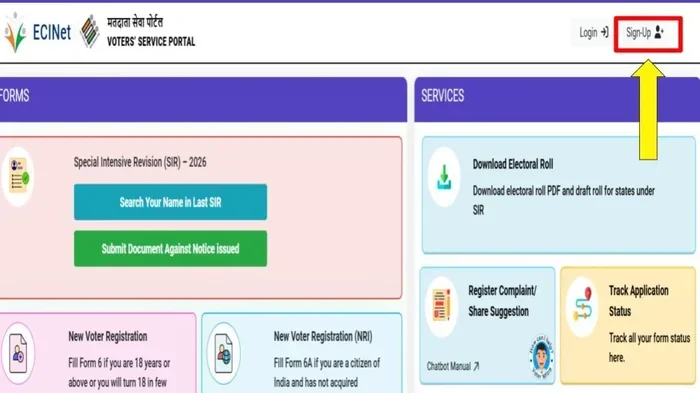
Fixing errors on your voter registration does not have to be stressful. Voter ID correction online lets you update your name, address, or other details from home. This guide shows you exactly how to do it without visiting an office. You will learn the steps, required documents, and common mistakes to avoid. Follow these tips to ensure your vote counts without any issues.
Mistakes happen. Maybe you moved to a new city. Maybe you got married and changed your name. Or maybe the spelling on your card is just wrong. These small errors can cause big problems on election day. You do not want to stand in line only to find out your details do not match.
The good news is that you can fix this without much hassle. Voter ID correction online makes the process smooth and quick. You can update your information from your phone or computer. You do not need to take time off work or travel to a government office.
In this guide, we will walk you through everything. You will learn how to spot errors, what documents you need, and how to submit your request. We will also share tips to avoid common mistakes. By the end, you will feel confident about fixing your voter details fast.
Key Takeaways
- Quick Process: You can fix most errors from home using official state websites.
- Required Documents: Keep your ID proof and address proof ready before starting.
- Deadlines Matter: Submit corrections well before election dates to avoid problems.
- Track Your Application: Use your reference number to check the status online.
- Avoid Common Errors: Double-check spelling and numbers before submitting forms.
- Offline Options: Visit polling stations if online methods do not work for you.
- Free Service: Most voter ID correction services cost nothing or very little.
📑 Table of Contents
Why Voter ID Correction Online Matters
Your voter ID is your key to participating in democracy. It proves who you are when you cast your ballot. If the information on it is wrong, you might face delays. In some cases, you could even be turned away. That is why keeping your details accurate is so important.
Doing this online voter registration update saves you time. You avoid long queues and confusing paperwork. Most states now offer digital tools to help citizens. These tools are designed to be simple. You just fill out a form and upload your proofs.
Think about the alternative. Visiting an office means waiting in line. It means taking a day off. It means dealing with unclear instructions. Online methods remove most of this stress. You can do it in your pajamas if you want. The system checks your details and guides you through each step.
Common Errors People Fix
People fix many types of mistakes. Some are small. Some are big. Here are the most common ones:
- Name Spelling: A missing letter or wrong surname can cause issues.
- Address Changes: Moving to a new home means updating your polling station.
- Date of Birth: Wrong birth dates can affect your eligibility.
- ID Number Errors: Typos in your unique ID number need quick fixes.
- Photograph Issues: Old or unclear photos may need replacement.
Any of these can create confusion. Fixing them early prevents headaches later. Voter ID correction online handles most of these issues smoothly.
Steps To Fix Errors Fast
You want to fix your details quickly. Speed matters, especially if an election is coming up. Here is a simple process you can follow. These steps work for most regions and systems.
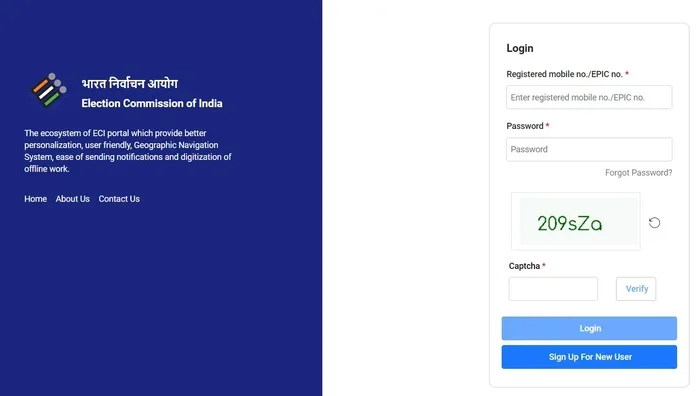
Visual guide about voter id correction online
Image source: imagecdn.99acres.com
Step 1: Gather Your Documents
Before you start, collect what you need. You will likely need proof of your identity. You will also need proof of your address. Keep these files ready on your device.
- Government ID: A passport, driver’s license, or existing voter card.
- Address Proof: A utility bill, bank statement, or lease agreement.
- Photograph: A recent passport-style photo if required.
- Old Voter ID: Keep your current card handy for reference numbers.
Having these ready makes the process faster. You will not need to pause to search for files. Online voter ID correction works best when you are prepared.
Step 2: Visit the Official Portal
Go to your state or local election website. Look for the voter services section. Find the option for corrections or updates. Make sure you are on the real site. Fake sites can steal your data.
Look for secure links. The address should start with https. You should see a lock icon in your browser. This keeps your personal information safe.
Step 3: Fill Out the Correction Form
You will see a form to fill out. Enter your current details first. Then enter the corrected information. Be careful with every field. A small typo can cause new errors.
Read each question twice. Make sure you understand what is asked. If you are unsure, look for help text on the page. Many portals offer examples or tooltips.
Step 4: Upload Your Proofs
Attach your documents as asked. Most systems accept PDF or image files. Make sure your files are clear and readable. Blurry images get rejected often.
Check the file size limits. Some portals have strict rules. Resize your images if needed. Keep your file names simple and clear.
Step 5: Submit and Save Confirmation
Review everything one last time. Click submit when you are sure. You should get a reference number or confirmation email. Save this safely. You will need it to track your request.
This step completes your voter ID correction online process. You have done the hard part. Now you just wait for approval.
Documents You Need For Quick Approval
The right documents speed up your request. Wrong or missing files cause delays. Here is what you should prepare before you start.
Identity Proof
You need to prove who you are. Most systems accept standard government IDs. A driver’s license works well. A passport is even better. Some places accept birth certificates too.
Make sure your ID is not expired. Expired documents often get rejected. Check the date before you upload.
Address Proof
If you moved, you need to show your new address. Utility bills are great for this. Electricity, water, or gas bills work. Bank statements also work in many places.
The document should show your name and address clearly. It should be recent, usually within the last three months. Old bills may not be accepted.
Photograph Requirements
Some systems ask for a new photo. This is common if your old photo is unclear. Use a plain background. Face the camera directly. Do not wear sunglasses or hats.
Your face should be fully visible. The photo should look like you today. Do not use an old selfie from years ago.
Additional Papers
Sometimes you need extra documents. For example, a marriage certificate helps if you changed your name. A court order helps with legal name changes. Check your local rules to see what applies.
Having these ready avoids back-and-forth emails. You want a smooth approval on the first try.
Avoid These Common Mistakes
Even simple forms can trip you up. Avoid these common errors to save time. A little care goes a long way.
Typing Errors
Typos are the biggest problem. One wrong letter can mismatch your records. Double-check your name spelling. Check your date of birth carefully. Verify your ID number digit by digit.
Read your entries out loud. This helps catch mistakes your eyes might skip. Ask a friend to review your form if you can.
Wrong Documents
Uploading the wrong file slows things down. Do not send a blurry photo. Do not send an expired ID. Do not send a document that does not match your name.
Read the file requirements first. Some systems only accept certain formats. Follow the rules exactly.
Missing Deadlines
Time matters. Submit your correction well before election day. Late changes might not process in time. You could end up with the wrong polling station.
Check the cutoff dates for your area. Plan ahead. Do not wait until the last minute.
Ignoring Confirmation
Some people forget to save their reference number. They submit the form and move on. Later, they cannot track their status. This causes unnecessary stress.
Always save your confirmation. Write it down or email it to yourself. Keep it until your new ID arrives.
Track Your Application Status
After you submit, you want to know what happens next. Most systems let you check your status online. This is a key benefit of voter ID correction online. You do not need to call anyone or visit an office.
How To Check Status
Go back to the same portal. Look for the track application option. Enter your reference number. You might also need your birth date or ID number.
The system will show your current status. It might say pending, approved, or needs more info. Check this regularly until it is done.
What Status Mean
- Pending: Your application is under review. This is normal.
- Approved: Your correction is accepted. You will get your updated ID soon.
- Rejected: Something went wrong. Read the reason and fix it.
- Needs More Info: You must upload additional documents. Do this quickly.
When To Worry
Most applications process within a few weeks. If it takes longer, check again. Maybe your documents were unclear. Maybe there was a system delay. Contact support if you see no progress for a long time.
Do not panic. Delays happen. Stay calm and follow up politely.
What To Do If Online Correction Fails
Sometimes the online system does not work. Maybe the website crashes. Maybe your documents get rejected. Maybe you just prefer talking to a person. That is okay. You have other options.
Try the Offline Method
Visit your local election office. Bring your documents with you. Speak to a staff member. They can guide you through the correction process in person.
This takes more time. But it works well when online methods fail. You get direct help. You can ask questions and get answers right away.
Visit Your Polling Station
Some places let you update details at your polling station. This is helpful during election season. Ask the officials there what you need to do. They know the local rules best.
Do not wait until you are in line to vote. Ask ahead of time. Make sure your correction is processed before you need to cast your ballot.
Contact Support
Most election websites have a help desk. Send them an email or call their number. Explain your problem clearly. Share your reference number if you have one.
Be polite and patient. Support teams handle many requests. Clear communication helps them help you faster.
Expert Tips For A Smooth Process
Want to make this even easier? Here are some expert insights. These tips come from people who have done this many times.
Use a Checklist
Make a simple checklist before you start. Write down every document you need. Tick each item as you gather it. This keeps you organized. You will not forget anything important.
Take Screenshots
While filling out the form, take screenshots. Save each step. If something goes wrong, you have proof of what you entered. This helps if you need to appeal or follow up.
Keep Copies Safe
Store your documents in a safe folder. Use cloud storage or a USB drive. Do not keep them only on your phone. Phones get lost or broken. Backup your files.
Update All Related IDs
When you fix your voter ID, update other IDs too. Change your address on your driver’s license. Update your bank records. Keep everything consistent. This prevents future mismatches.
Ask for Help If Needed
Do not struggle alone. Ask a family member or friend to help. Two pairs of eyes catch more mistakes. This is especially helpful if the form is long or confusing.
Key Takeaways
Let us recap the most important points. Keep these in mind as you proceed.
- Start Early: Do not wait until election day is close.
- Prepare Documents: Have all proofs ready before you begin.
- Double-Check Everything: Review your entries for typos and errors.
- Save Confirmations: Keep your reference number safe.
- Track Regularly: Check your status until it is approved.
- Use Official Sites: Only use government portals for safety.
- Stay Calm: Delays happen. Follow up politely if needed.
Conclusion
Fixing errors on your voter registration does not have to be hard. Voter ID correction online gives you a fast and simple way to update your details. You can do it from home, on your own time. You just need the right documents and a careful approach.
Follow the steps in this guide. Gather your proofs. Fill out the form carefully. Upload clear documents. Save your confirmation. Track your status until it is done. Avoid common mistakes like typos and expired files. If the online system fails, use offline options.
Your vote matters. Make sure your details are correct so nothing stands in your way. Take action today. Fix your voter ID errors fast and participate with confidence.
Frequently Asked Questions
How long does voter ID correction online take?
Most corrections process within a few weeks. The exact time depends on your local system and how many applications they handle. Check your status regularly using your reference number to stay updated.
Can I correct my voter ID without visiting an office?
Yes, most regions allow you to fix errors online. You just need to visit the official election portal and submit the correction form. Online voter registration update is designed to save you time and effort.
What documents do I need for voter ID correction online?
You usually need proof of identity and proof of address. A government ID, utility bill, or bank statement works well. Some systems also ask for a recent photograph and your old voter card.
Is voter ID correction online free?
Yes, most official correction services cost nothing. You should not pay anyone to fix your voter details. Use only government websites to avoid scams and hidden fees.
What if my online correction gets rejected?
Read the reason for rejection carefully. Fix the issue and resubmit your application. If you cannot resolve it, visit your local election office for direct help and guidance.
Can I track my voter ID correction status online?
Yes, you can track your application on the same portal where you submitted it. Enter your reference number to see if your request is pending, approved, or needs more information.